
Soundshed Guitar is a guitar/bass effects app and plugin combining Neural Amp Modeler (NAM) with a modern UI. It targets VST3, AU, CLAP and AAX formats with an extensible signal graph architecture.
Downloads: https://guitar.soundshed.com
Requirements: x64 CPU with AVX2 support (Intel Haswell 2013+, AMD Excavator 2015+), or M1 onwards for macOS. Windows builds can drop to a lower SIMD baseline with build_windows.bat --simd avx (Intel Sandy Bridge 2011+, AMD Bulldozer 2011+, still fully vectorised) or --simd sse2 (no AVX at all).
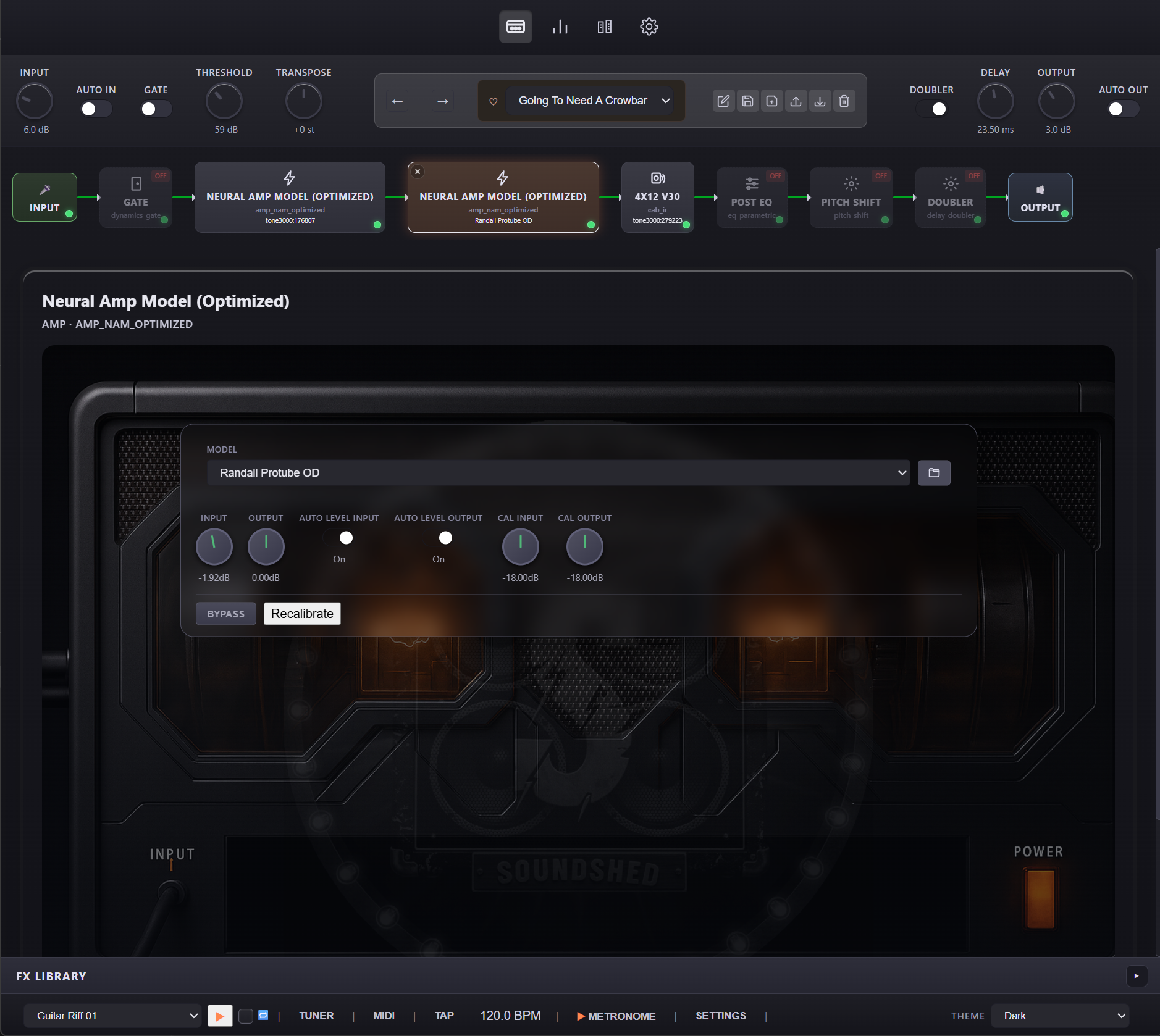
- Neural Amp Modeler DSP for amp/pedal captures, with optional global 2x–32x time-scaled oversampling
- Flexible signal graph with arbitrary effect ordering and parallel paths
- Preset management with category support and content-addressed resource deduplication
- Remote preset search/download for community sharing
- WebView UI (HTML/CSS/TypeScript)
See docs/ for architecture and reference documentation:
| Document | Description |
|---|---|
| Agent Quickstart | Minimal, high-signal guide for AI agents |
| Architecture Overview | System layers, design principles, performance targets |
| Signal Chain | Graph model, execution, buffer management |
| FX Library | Effect types, registry, resource configuration |
| Data Models | Preset schema, storage layout |
| User Interface | WebView architecture, message protocol |
| Network API | REST API, client, plugin formats |
| Theme System | CSS theming |
For minimal context with high coverage, load these files:
- docs/agent-quickstart.md
- docs/architecture-overview.md
- docs/signal-chain.md
- docs/fx-library.md
- docs/data-models.md
- docs/user-interface.md
- .github/copilot-instructions.md
-
Clone and configure
git clone <repo-url>
cd soundshed-guitar
cmake -S juce -B juce/builds -DCMAKE_BUILD_TYPE=RelWithDebInfo
CMake fetches core dependencies (for example NeuralAmpModelerCore) via FetchContent.
-
Build
cmake --build juce/builds --config RelWithDebInfo
-
Install
- Windows VST3: Copy
.vst3frombuild/SoundshedGuitar.vst3toC:\Program Files\Common Files\VST3\ - macOS VST3: Copy to
~/Library/Audio/Plug-Ins/VST3/
- Windows VST3: Copy
| Format | Requirement |
|---|---|
| VST3 | Set VST3_SDK_ROOT environment variable |
| AU | macOS with Xcode command-line tools |
| AAX | Set AAX_SDK_ROOT (requires Avid SDK access) |
Edit core/config/GuitarFXConfig.h to customize plugin name and manufacturer. Rebuild after changes.
- UI source:
core/ui/ts/(TypeScript) - Build UI:
cd core/ui && npm run build - Android: see docs/android-build.md
- iOS and iPadOS: see docs/ios-build.md
- Core tests: Enable with
GUITARFX_CORE_BUILD_TESTS=ON, run via CTest
git submodule update --init --recursive
- node/npm, ts (
npm install -f typescript)
cd /core/ui/
npm install
The JUCE target can be built and staged on Linux with the root helper script:
bash ./build_linux.sh --arch x64 --zip
bash ./build_linux.sh --arch arm64 --zip
This configures juce/builds-linux-x64 and juce/builds-linux-arm64, builds the JUCE Standalone, VST3, and CLAP targets, stages Linux distribution layouts in linux-dist-x64/ and linux-dist-arm64/, writes the standalone app to opt/Soundshed/soundshed-guitar/soundshed-guitar, and creates per-architecture archives for distribution.
To build both Linux targets in one invocation, use:
bash ./build_linux.sh --arch all --zipWhen cross-compiling, the helper uses the repo toolchain files under cmake/toolchains/. Install the matching cross compiler plus target sysroot, and set GUITARFX_LINUX_SYSROOT, GUITARFX_LINUX_PKG_CONFIG_LIBDIR, and GUITARFX_LINUX_PKG_CONFIG_SYSROOT_DIR if your distro packages live outside the default search paths.
To include the LV2 bundle in the Linux build and staging layout, enable it explicitly:
bash ./build_linux.sh --arch x64 --lv2 --zip
bash ./build_linux.sh --arch arm64 --lv2 --zip
If you need to match CI dependencies on Ubuntu, install the JUCE Linux packages used by the workflow first:
sudo apt-get update
sudo apt-get install libasound2-dev libx11-dev libxinerama-dev libxext-dev libfreetype6-dev libwebkit2gtk-4.1-dev libglu1-mesa-dev ninja-build
# The native (Nano) UI, built into every desktop build: Elements' X11 host and Cairo.
sudo apt-get install libxrandr-dev libxcursor-dev libcairo2-dev libharfbuzz-dev libwebp-dev libfontconfig1-dev
The app can also draw itself with the native (Nano) UI instead of the WebView, for a desktop
where WebKitGTK is missing or misbehaves. Start it once with --native-ui and it stays that way
(the native UI's Standard UI button, or --web-ui, goes back):
/opt/Soundshed/soundshed-guitar/soundshed-guitar --native-uiFull rebuild:
Remove-Item -Recurse -Force juce/builds
cmake -G "Visual Studio 18 2026" -A x64 -S juce -B juce/builds
cmake --build juce/builds --config Release --target ALL_BUILD --parallel
Offline Processing Test
cmake --build build --config Debug --target GuitarFX_OfflineProcessingTest
./GuitarFX_OfflineProcessingTest.exe input.wav output.wav [model.nam] [cabinet.wav]
VST3 Debug Host
cmake --build build --config Debug --target VST3DebugHost
./VST3DebugHost.exe --windowed
Testing plugin builds with external resources can be done with pluginval against the generated VST3.
This repository depends on or vendors the following third-party libraries and SDK components:
- JUCE and the CLAP JUCE extensions in
juce/ - Microsoft WebView2 for the Windows WebView host path
- NeuralAmpModelerCore, NAM-Oversampler AudioDSPTools, and Eigen used by the NAM DSP stack in
core/ - nlohmann/json, Signalsmith Audio linear/stretch, stftPitchShift, miniz, and the Wasmtime C API in the core CMake dependency setup
- jszip, TypeScript, and Vitest in
core/ui/
See THIRD_PARTY_NOTICES.md, the upstream LICENSE files, and package manifests for the exact license terms of each dependency.
AGPL-3.0. Third-party components retain their upstream licenses.
- Soundshed and Soundshed Guitar are copyright Webprofusion Pty Ltd via soundshed.com and permission to re-use the Soundshed/Soundshed Guitar brand is not granted.
- All services/APIs used by the app are excusively for use by our own software unless permission to use has been granted in writing to your project.
- All content resources (NAM, IR etc) are copyright their respective creators.
- For DMCA requests etc contact guitar at soundshed.com.