


Sift is a fast, no-fuss media sorting tool for Windows. Open a folder of images, videos, or audio files, set up your destinations, and move through them one by one with a single keypress. Built for the moment you realize you have gigabytes of unsorted media and just need to get through it.
 Grid Mode View:
 Light Mode:
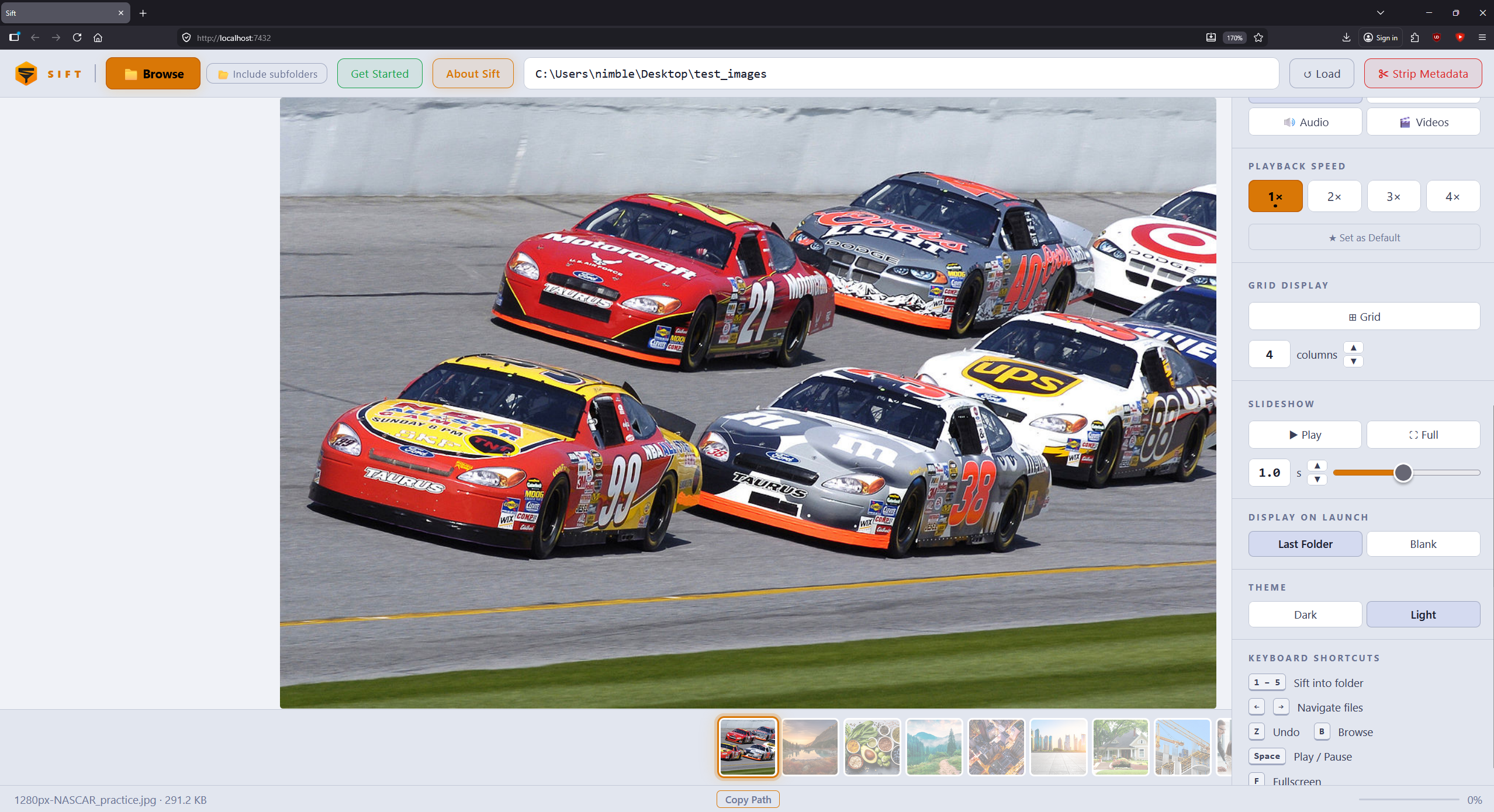
Sift-Extended is a fork of the original Sift by NimbleCloud13 that adds performance improvements for large video collections, preview rotation, an in-page folder browser, a persistent mute control, stream-copy video editing, more reliable file moves, and a streamlined destinations panel. All of the original functionality is preserved. See What's new in this fork for details.
- Handles large video folders without freezing. Thumbnails are generated lazily as items scroll into view (via an
IntersectionObserver), with a concurrency-limited queue and small off-screen canvases, and the filmstrip and grid are built in non-blocking batches. Loading folders with hundreds of videos no longer hangs the page. - Rotate the preview. Rotate-left / rotate-right buttons in the filmstrip rotate the current image or video preview in 90° steps (preview only, the file on disk is untouched). Rotated videos render through a
<canvas>so they display correctly at 90°/270° instead of appearing blank. - In-page folder browser. Browsing for a folder now opens a built-in file browser inside the app instead of a native OS dialog, so it works even on Python installs without
tkinter. Backed by a new/api/list_direndpoint. - Persistent mute button. A mute toggle (🔊 / 🔇) in the video/audio control bar, also bound to the M key. The mute state carries over between videos and is remembered across sessions.
- More reliable sorting of videos. Fixes the intermittent
Unexpected token '<'error when sifting a playing video. The browser's file handle is released before the move, transient Windows file locks are retried server-side, and API errors now always return JSON (never an HTML error page). - Combined destinations panel. The "Sift Destinations" and "Sift Into Folder" sections are merged into one: each destination row has a compact colored numbered button that both labels and triggers the sort (up to 10 destinations).
- Video edit panel (stream-copy cuts). On videos, an edit strip below the transport controls offers previous/next keyframe, Mark A / Mark B (auto-snapped to keyframes), and Delete (removes A–B from an in-app cut list). Sifting then:
- With A and B set → exports the A–B selection as
originalname_edit.extinto the destination (original stays selected). - With a modified cut list (no active A/B) → exports the kept segments the same way.
- With no edits → moves the original file (existing behavior). Cuts use ffmpeg stream copy (no re-encode). Edit state clears when you navigate to another file.
- With A and B set → exports the A–B selection as
- Supports images, video, and audio
- Up to 10 custom sort destinations with keyboard shortcuts (
1–9,0for the 10th) - Filmstrip view with video thumbnails
- Re-sort already-sorted files into a different destination at any time
- Undo last sort with Z
- Filter view by media type (images, video, or audio)
- Strip Metadata. Duplicate any folder with embedded metadata removed from every file (images via Pillow, video/audio via ffmpeg)
- Slideshow mode with fullscreen support
- Scroll-to-zoom on images and video, with click-and-drag panning when zoomed in
- Video edit panel. Keyframe seek, A/B marks, delete range; sift exports
originalname_edit.extvia ffmpeg stream copy when a selection or cut list exists - Paste any folder path directly into the path box and press Enter to load
- Runs locally. No internet connection, no account, no telemetry
- Strip Metadata. Duplicate any folder with GPS tags, camera info, timestamps, and other personally identifying metadata scrubbed from every file. Original folder is untouched. Images are cleaned instantly. Video/audio files require ffmpeg. Sift will offer to install it automatically if needed, or you can skip those files
- Grid view. See all loaded images at once in a full-window grid. Adjustable column count, click any image to jump to it, optional autoscroll with speed control
- Slideshow mode. Auto-advance through files at an adjustable interval. Pair with fullscreen for a gallery experience
- Display on Launch. Choose whether Sift reopens your last folder on startup or opens blank
- Light and dark mode. Toggle between themes from the controls panel. Preference is remembered across sessions
- Copy Path. One-click copy of the current file's full path to the clipboard
- Windows 10 or 11
- Python 3.10+
tkinteris optional. It is only used for the system-tray/taskbar window; Sift runs fine without it (folder browsing uses the built-in in-page browser). If it's missing, Sift falls back to plain terminal mode.- ffmpeg (with ffprobe) is required for the video edit panel and for stripping metadata from some video formats. Sift can install it via Windows Package Manager when prompted.
- Create a folder where you want Sift to live (e.g.
C:\Sift) - Download install.bat from this repo into that folder
- Double-click
install.bat - A shortcut will appear on your Desktop. Double-click it to launch Sift
Sift installs into the same folder as install.bat, so put it where you want it to live before running. The installer will check for Python, download Sift, install all dependencies, and create a Desktop shortcut automatically.
Note: Python 3.10+ is required. If you don't have it, the installer will open the download page for you. When installing Python, make sure to tick "Add Python to PATH".
pip install -r requirements.txt
python server.py| Key | Action |
|---|---|
1–9 |
Sift file to destination 1–9 |
0 |
Sift file to destination 10 |
← / → |
Navigate files |
Z |
Undo last sift |
Space |
Play / pause |
M |
Mute / unmute |
F |
Toggle fullscreen |
B |
Browse for folder |
Preview rotation is available from the rotate buttons in the filmstrip (rotates the current preview only, in 90° steps).
Video editing controls appear under the transport bar when a video is open: previous/next keyframe, Mark A / Mark B, and Delete. With A–B set (or after Delete cuts), pressing a sift destination exports
originalname_edit.extand leaves the original selected.
Free for personal, non-commercial use. See LICENSE for full terms.
For commercial licensing enquiries: x.com/NimbleCloud13
Sift-Extended is a fork maintained by slikvik55.
Original Sift created by NimbleCloud13 · GitHub · Reddit
If you find Sift useful, please support the original author: ☕ Buy me a coffee