
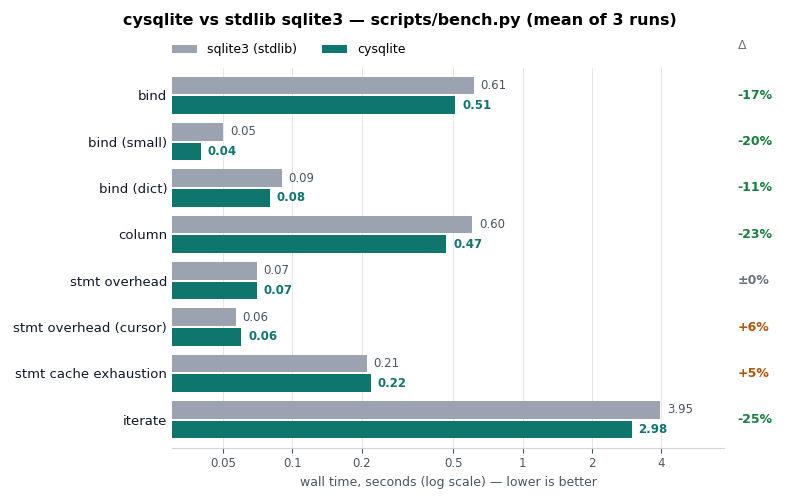
cysqlite provides performant bindings to SQLite. cysqlite aims to be roughly
compatible with the behavior of the standard lib sqlite3 module.
cysqlite supports standalone builds or dynamic-linking with the system SQLite.
cysqlite is a Cython-based SQLite driver that provides:
- DB-API 2.0 compatible
- Performant query execution
- Transaction management with context-managers and decorators
- User-defined functions, aggregates, window functions, and virtual tables
- BLOB support
- Row objects with dict-like access
- Schema introspection utilities
- Asyncio support
- Easy to create fully self-contained builds
cysqlite can be installed as a pre-built binary wheel with SQLite embedded into the module:
pip install cysqlitecysqlite can be installed from a source distribution (sdist) which will link against the system SQLite:
# Link against the system sqlite.
pip install --no-binary :all: cysqlite
If you wish to build cysqlite with encryption support, you can create a self-contained build that embeds SQLCipher. At the time of writing SQLCipher does not provide a source amalgamation, so cysqlite includes a script to build an amalgamation and place the sources into the root of your checkout:
# Obtain checkout of cysqlite.
git clone https://github.com/coleifer/cysqlite

# Automatically download latest source amalgamation.
cd cysqlite/
./scripts/fetch_sqlcipher  # Will add sqlite3.c and sqlite3.h in checkout.

# Build self-contained cysqlite with SQLCipher embedded.
SQLCIPHER=1 pip install .
Alternately, you can create a self-contained build that embeds SQLite3 Multiple Ciphers:
- Obtain the latest
*amalgamation.zipfrom the sqlite3mc releases page - Extract
sqlite3mc_amalgamation.candsqlite3mc_amalgamation.hinto the root of the cysqlite checkout. - Run
pip install .
Example usage:
from cysqlite import connect

db = connect(':memory:')

db.execute('create table data (k, v)')

with db.atomic():
    db.executemany('insert into data (k, v) values (?, ?)',
                   [(f'k{i:02d}', f'v{i:02d}') for i in range(10)])
    print(db.last_insert_rowid())  # 10.

curs = db.execute('select * from data')
for row in curs:
    print(row)  # e.g., ('k00', 'v00')

# We can use named parameters with a dict as well.
row = db.execute_one('select * from data where k = :key and v = :val',
                     {'key': 'k05', 'val': 'v05'})
print(row)  # ('k05', 'v05')

db.close()cysqlite lets you extend SQLite with ordinary Python callables. Functions and collations are registered on the connection and automatically restored if it is closed and re-opened:
- Scalar functions:
db.create_function(fn) - Aggregates:
db.create_aggregate(cls)(step()+finalize()) - Window functions:
db.create_window_function(cls)(addsinverse()+value()) - Table-valued functions:
@db.table_function(columns=[...])over a generator - Collations:
db.create_collation(fn)
Connection hooks observe or veto activity (pass None to clear):
- Commit / rollback hooks:
db.commit_hook(fn),db.rollback_hook(fn) - Update hook:
db.update_hook(fn)(fires on INSERT, UPDATE or DELETE) - Authorizer:
db.authorizer(fn)
# Scalar function.
db.create_function(str.title, 'title_case')
db.execute('select title_case(?)', ('heLLo wOrLd',)).fetchone()  # ('Hello World',)

# Table-valued function from a generator.
@db.table_function(columns=['value'])
def series(start, stop, step=1):
    i = start
    while i < stop:
        yield (i,)
        i += step

list(db.execute('select value from series(0, 10, 2)'))  # [(0,), (2,), (4,), (6,), (8,)]

# Veto a COMMIT from Python (a truthy return turns it into a ROLLBACK).
readonly = True
db.commit_hook(lambda: readonly)
See the user-defined functions guide for full examples.