
🇪🇸 Español | 🇧🇷 Português Brasileiro
A Complete Learning System for RemNote.
Incremental Everything allows you to interleave your flashcard reviews with notes, books, websites, and videos. Heavily inspired by SuperMemo's Incremental Reading, it transforms RemNote into a powerful lifelong learning tool that handles the entire lifecycle of knowledge: Acquisition → Processing → Mastery.
- Incremental Reading: Read and review 1000s of notes, books, and websites in parallel. Learn more.
- Incremental Writing: Write your essays and blog posts incrementally to maximize creativity. Learn more.
- Incremental Video: Watch and take notes on your YouTube video backlog.
- Incremental Tasks: Clear out your tasklist between flashcard reviews.
Manage information overload with a robust dual-priority system:
- Absolute & Relative Priorities: Prioritize items from 0-100 and see exactly where they rank.
- Priority Inheritance: New extracts and flashcards automatically inherit the priority of their source material.
- Priority Shield & Weighted Shield: Diagnostic tools showing your capacity to process high-priority material and the fraction of your total priority-weighted queue processed.
- FSRS Analytics: Real-time Difficulty (D), Stability (S), and Retrievability (R) statistics computed for flashcards.
- Priority Review Documents: Generate focused study sessions for your top items when overwhelmed.
A full suite of history and practice tools now built into the right sidebar:
- Visited Rem History: jump back to any document you navigated to recently.
- Flashcard History: find and open any flashcard you've reviewed, searchable by front and back text.
- Practiced Queues Dashboard: real-time session metrics (speed, retention, card age) and a full history of every practice session, with Export/Import backup.
- Mastery Drill: a focused re-practice queue for cards you rated Forgot or Hard — inspired by SuperMemo's Final Drill. Open with the
Mastery Drillcommand or via the Left Sidebar notification.
👉 Full documentation on the wiki
- Light Mode (Default for Mobile/Web): Fast, stable, and essential features only. Prevents crashes on phones and tablets.
- Full Mode (Desktop Power User): Complete feature set with heavy statistical calculations for detailed analytics.
- Open the RemNote plugin store, search for "Incremental Everything" and install the plugin.
This README covers the basics. For the comprehensive guides, please visit the User's Manual:
-
Introductory Videos:
-
Priorities Playlist: Prioritization in Incremental Everything – Covers setting priorities, inheritance, the Priority Shield, creating Priority Review Documents, and how to use prioritization to manage information overload.
-
What is Incremental Reading?: Incremental Journey - Incremental Reading in Simple Terms
- Changelog: See the latest features and updates.
- Discord: Join the community and chat with us (look for the plugin channels).
- Make Incremental: Make any Rem, PDF, or Website
Incrementalusing the/Make Incremental (Extract)command (Shortcut:Alt+X).- Extract Selection: If you have text selected,
Alt+Xwill extract that specific piece into a new child Rem and link it back.
- Extract Selection: If you have text selected,

- Prioritize it: Use
Alt+PorAlt+Shift+X(Extract with Priority) to set its importance. - Copy/Paste Sources: Efficiently link multiple chapters to one PDF using
Ctrl+Shift+F1(Copy) andAlt+Shift+V(Paste). - Create Flashcards: Use
Alt+Zto quickly create a Cloze Deletion from selected text. - Review it: The plugin interleaves these items into your regular flashcard queue.
- Disable it: Remove the
Incrementaltag or press the Dismiss button in the queue if you are done reviewing it.
- 0 is for your most important material and 100 is for the least important.
- Change Priority: Click the button in the queue or press
Alt+Pto open the full priority popup. - Quick Shortcuts: Use
Ctrl+Opt+Up/Ctrl+Opt+Downto adjust priority instantly without breaking flow. - Sorting Criteria: Use the queue menu to adjust the balance between Structure (strict priority) and Exploration (randomness), and control the ratio of Flashcards to Reading material.
- Default Scheduler: Uses an exponential formula —
interval = ⌈Multiplier ^ N⌉days (multiplier defaults to 1.5). Simple and effective for items needing few reviews. - Beta Scheduler (Saturating Curve): An opt-in alternative where intervals start at a configurable First Review Interval (default 5 days) and gradually approach a Max Interval (default 30 days). Ideal for items needing many reviews (books, chapters). See the IncRem Scheduler wiki page for details.
- You can manually set the next repetition date using the Reschedule command (Ctrl+J), or RemNote's tables and properties features.
The plugin now features Automatic Light Mode.
- When you open RemNote on iOS or Android, the plugin automatically switches to "Light Mode".
- This disables heavy background calculations to ensure a crash-free experience on mobile devices.
- Your desktop experience remains fully featured.
- You can tag PDFs, websites and highlights with the
Incrementaltag to do classic SuperMemo-style incremental reading. - It will work if you tag the PDF or website itself, a Rem with a single PDF or website as a source, or a Rem with multiple sources where exactly one PDF has the
#preferthispdftag. - The plugin will render the PDF or website reader view inside the queue.
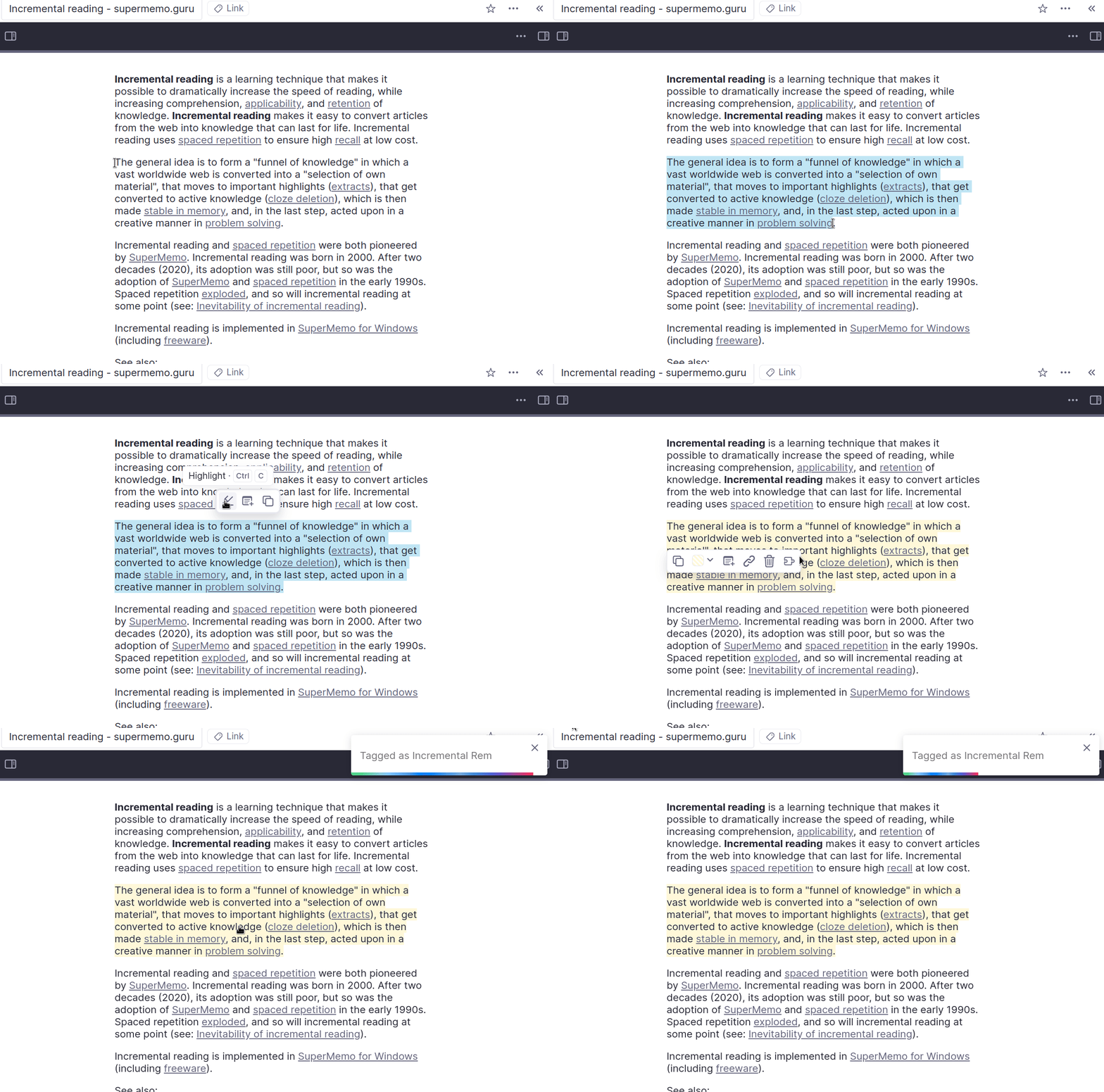
- If you want to turn a highlight into an incremental Rem, click on the highlight and click the puzzle piece icon.
- 📄 PDFs & Web
- Visual Status: Highlights turn Green when toggled as Incremental, and Blue when extracted.
- PDF Control Panel: Manage chapters, set page ranges, and view reading history for long documents.
- Position Tracking: The plugin automatically saves your last read page when using the PDF Chapter workflow or creating extracts.
- Create Incremental Rem: Select text in a PDF -> Highlight it -> Click the Funnel Icon -> "Create Incremental Rem". This extracts the text to a new Rem under a parent of your choice (using the smart parent selector).

- You can tag any normal Rem with the
Incrementaltag to turn it into an incremental Rem. - The plugin will render it as a normal Rem in the document view in the queue.
- You can tag YouTube videos with the
Incrementaltag to watch them incrementally. - It will work if you tag the link Rem itself, or a Rem with the YouTube link as a source.
- Video Extracts: Create precise sub-clips with specific start/end timestamps, each with its own schedule and priority.
- Auto-Transcription: Automatically fetch YouTube transcripts for extract ranges to make content searchable and ready for clozing. [P.S.: Currently down after YouTube recent anti-bot measures]
- The plugin will automatically save your progress and playback rate.
- You can open the resizable notes section on the left to take notes while you watch.

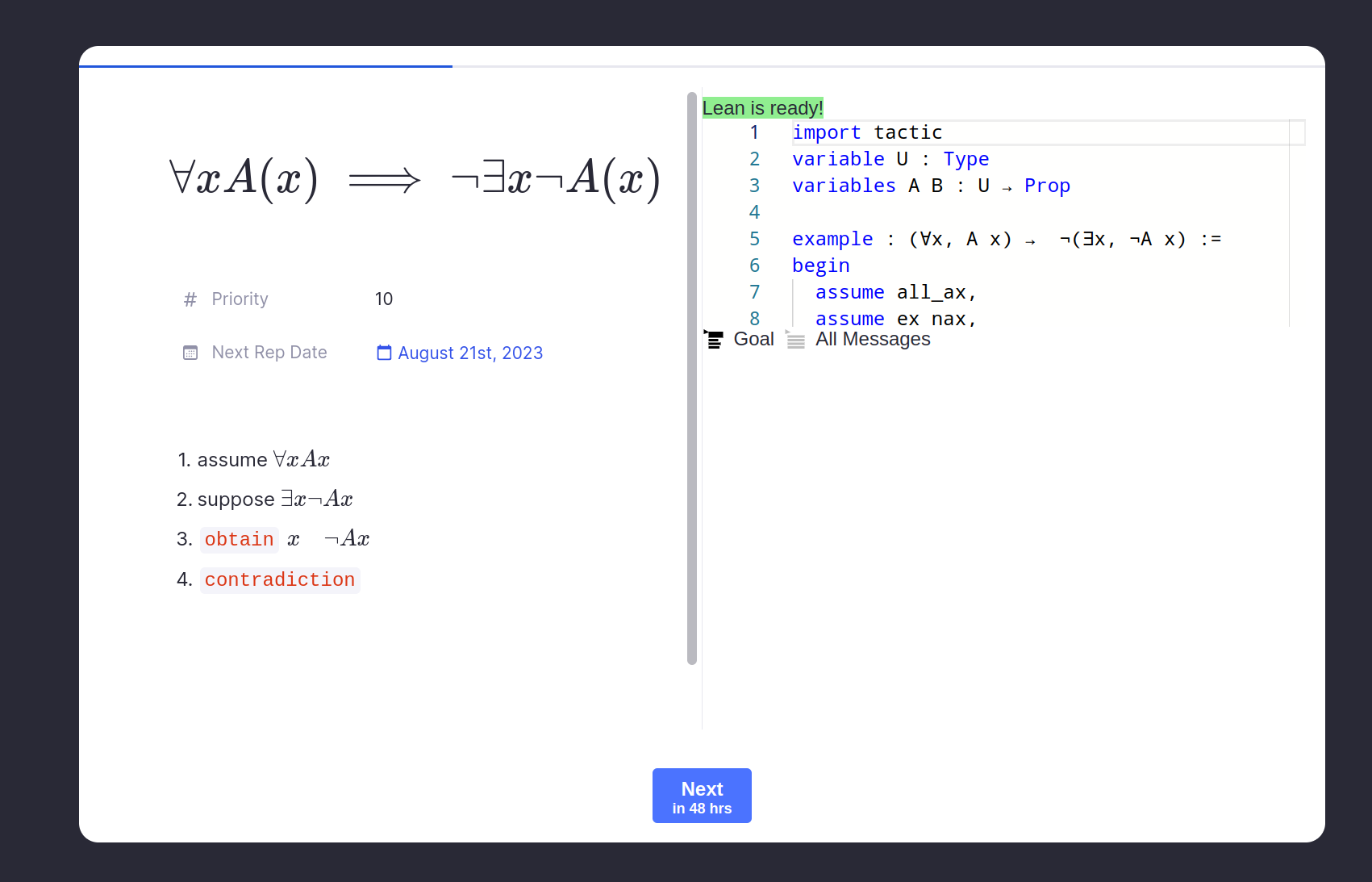
- A quick example of plugin interoperability.
- Integrates with my Lean theorem prover plugin to schedule math proof problem sets over time.
- The Lean plugin provides the queue widget and the Incremental Everything plugin provides the scheduling.
- I hope other devs can build similar integrations with their plugins!
- You can do basic subset reviews by studying a particular document. Only Rem from that document will be shown to you.
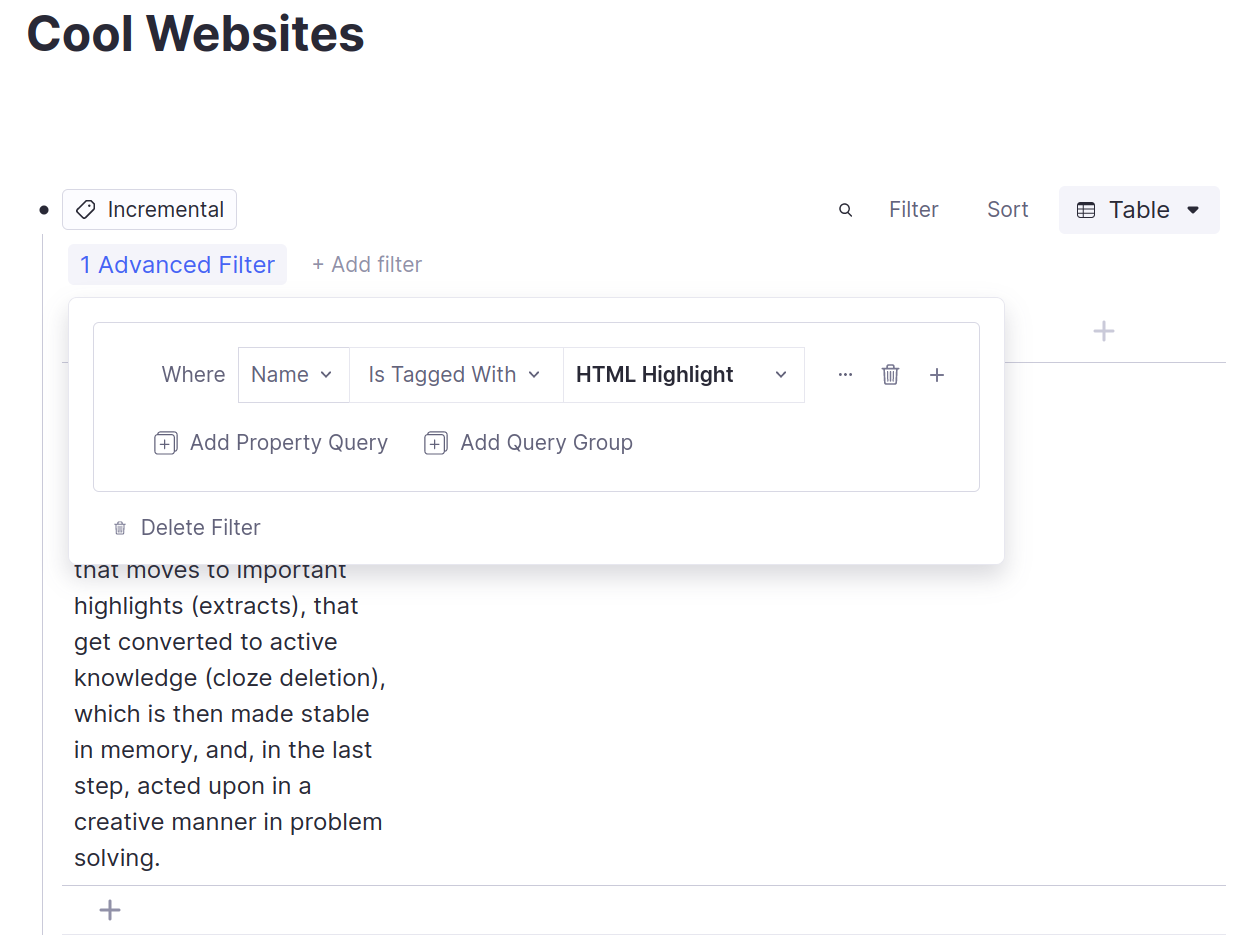
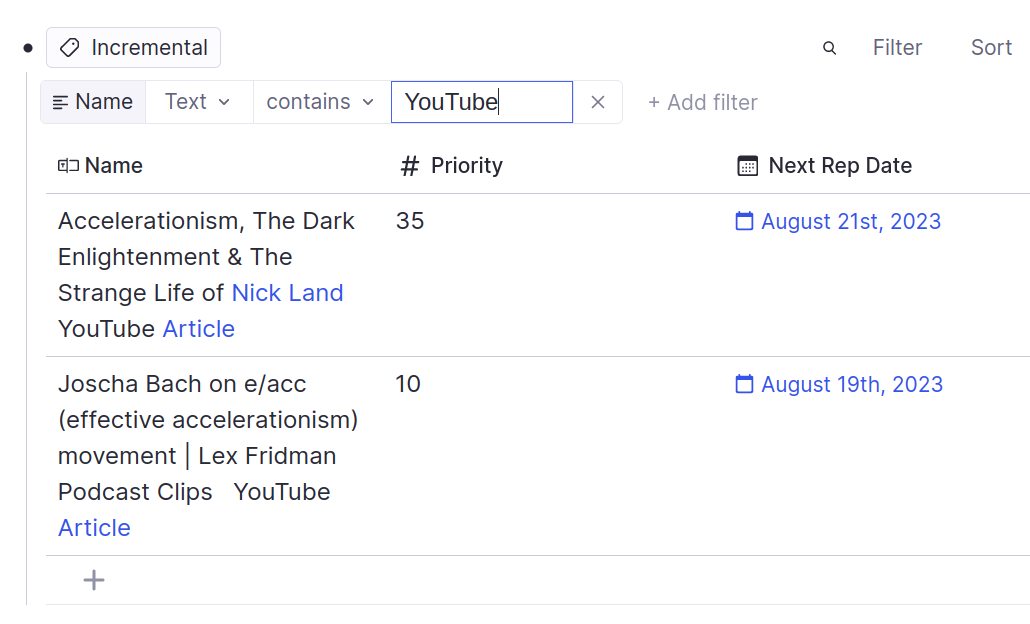
- You can also create a table from the
Incrementaltag and filter it down to a sorted subset using the table filter and sort features. - You can review the rows of a table in order by sorting the table and using the "Practice in Order" practice mode.
There are lots of ways you can filter the table to create a subset of Rem to review. Here are some examples:
- Only Web extracts
- Only YouTube videos
Previously, reading positions for large PDFs were easily lost.
- The Solution: The plugin now supports a Chapter-based workflow. By splitting a PDF into multiple Incremental Rems (each with a defined page range) or using PDF Highlights as incremental items, the plugin reliably saves and restores your reading position for each specific item.
- The Remaining Challenge: While we can now track positions per item, the RemNote Plugin SDK still lacks direct programmatic control over the native PDF viewer's internal scroll engine. This means that while we can take you to the correct page, we cannot yet control the exact vertical pixel scroll within that page.
- How You Can Help: We are still advocating for a more robust Plugin API. Please continue to upvote our request for better programmatic scroll control.
➡️ Upvote the Feature Request on the RemNote Feedback Site
When viewing a regular Rem card in the queue, the editor correctly appears. However, native queue keyboard shortcuts will take precedence over typing in the editor. This appears to be due to a limitation in the current plugin API that prevents a plugin from fully capturing keyboard input within the queue environment. The "Press 'P' to Edit" button has been added as a workaround. You can also use the newly created button "Review in Editor".
- The plugin stores repetition data as powerup properties on the Rem. These aren't "normal" RemNote flashcards. All of the scheduling is managed internally by the plugin.
Run the following commands:
git clone https://github.com/bjsi/incremental-everything
cd incremental-everything
npm i
npm run dev
Then follow this part of the quick start guide to get the plugin running in RemNote.