
Omarchy Workspace attaches a validated project context to the currently focused Hyprland workspace. A native Omarchy Quickshell widget shows that context and offers only fixed terminal, optional Hermes, and detach actions.
Hyprland workspaces remember windows, but not what a workspace means. Omarchy Workspace adds persistent project identity: repository, expected branch, task, and optional Hermes profile stay together while the context moves between workspaces. That makes the bar useful at a glance and keeps terminal and agent launches pointed at the validated project instead of whichever directory a helper happened to inherit.
The context represents the work. The workspace is only where that work is currently attached. Contexts persist under the XDG state directory; workspace attachments can change without rewriting the context. The CLI is the sole state writer, and the UI reads only validated snapshots.

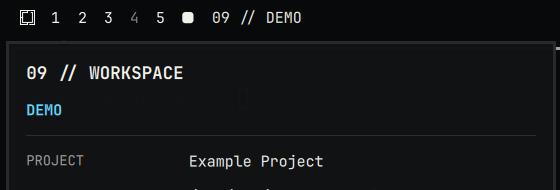
Additional real captures show the dirty indicator, blocked branch mismatch, and ordinary detached workspace.


- Omarchy 4 with its native Quickshell plugin management commands
- Linux with Hyprland and the Omarchy user session
- Python 3.11–3.14
- Git when observing a repository or enforcing an expected branch
- Hermes only if you want the optional Hermes action
The installer does not use pip, uv, Bash, sudo, or a system package manager, and it never installs Hermes. Exact tested versions and required/optional/development dependencies are in docs/compatibility.md.
git clone https://github.com/archer-clawbot/omarchy-workspace.git
cd omarchy-workspace
./install install
The installer validates dependencies and source files before mutation. It stages a content-addressed CLI runtime and physical Quickshell plugin, disables an existing enabled copy during replacement, validates the installed bytes, rescans Omarchy, and enables a clean installation only after final validation.
Detailed paths, transaction behavior, and deterministic output are documented in docs/installation.md.
- Install from the checkout with
./install install. - Switch to a workspace with a terminal or editor focused in a Git repository, then click the workspace widget.
- Review the Detected project proposal and choose CREATE & ATTACH. Detection is read-only until this explicit approval.
- The bar immediately shows the new project identity. Use Open terminal, Launch Hermes when configured and allowed, CHOOSE EXISTING to attach another saved context, or Detach to remove the workspace attachment.
The happy path does not require typing a long context create command; manual creation remains available for advanced configuration.
From a project repository:
omarchy-workspace context create example-project \
  --display-name "DEMO" \
  --project-name "Example Project" \
  --repo-path "$PWD" \
  --expected-branch main
Hermes is optional. To configure its fixed action, add --agent-id hermes --agent-profile default.
Focus the intended Omarchy workspace, then run:
omarchy-workspace assign example-project
omarchy-workspace current
The first command attaches the context to the focused workspace. current prints the authoritative attachment for that workspace.
The bar shows the ordinary workspace identity plus the attached context label. Click it to open the bounded panel. The panel displays only validated snapshot fields. A diamond marks a dirty Git tree, and an exclamation mark has precedence when branch policy blocks launch.
Detached, malformed, unavailable, or stale state fails muted. An in-flight result from an older focus epoch cannot republish metadata or actions after focus changes.
Use Open terminal to launch the Omarchy terminal in the validated context working directory. Use Launch Hermes only when the context configures Hermes and its profile is valid.
Both actions are bound to the exact workspace selector from the displayed snapshot. The panel cannot run arbitrary commands. Hermes remains optional and is never installed or modified by this project.
If expectedBranch differs from the observed branch, or branch observation is unavailable, the panel preserves the warning facts. Open terminal remains available for a valid working directory and never claims an override; Launch Hermes remains blocked by default. The CLI's explicit agent --allow-branch-mismatch option is the only branch-policy override. Omarchy Workspace never checks out, fetches, pulls, stages, or otherwise mutates Git.
From an updated checkout:
git pull --ff-only
./install update
Update preserves the prior enabled/disabled state, stages both payloads, disables the UI during replacement, and rolls back the previous CLI, plugin, and enabled state if installed validation or activation fails. Same-version reinstall is supported because payload identity includes its exact content digest.
./install disable
./install enable
These use Omarchy's supported plugin interface and verify native state readback. Disabling removes the widget and its actions while leaving the CLI and canonical state intact. Re-enabling projects the currently focused workspace after a fresh snapshot.
Equivalent native commands are:
omarchy plugin disable io.github.archer-clawbot.omarchy-workspace
omarchy plugin enable io.github.archer-clawbot.omarchy-workspace./install uninstallUninstall disables and removes the project-owned plugin, stable CLI entry point, and project runtime payloads. Missing project-owned components are handled idempotently. Unrelated files are never removed.
Ordinary uninstall preserves contexts and attachments under:
${XDG_STATE_HOME:-$HOME/.local/state}/omarchy-workspace
Reinstalling restores their presentation. Destructive removal requires explicit intent:
./install uninstall --purge-stateThat option removes only the exact project state directory after program/plugin removal.
required dependency unavailable: verify Omarchy 4 is installed and its plugin commands are inPATH.refusing to replace unrelated ...: move or inspect the named non-project file; the installer will not overwrite it.plugin ... is not known: runomarchy-shell shell rescanPlugins, then retry enable.- Branch mismatch: switch branches yourself if appropriate, then refresh; no automatic checkout is provided.
- Missing Hermes action: install/configure Hermes separately or omit agent fields from the context.
- Shell UI does not refresh: run
omarchy restart shell; canonical context state is preserved.
The CLI owns durable state and all mutations. Quickshell consumes only omarchy-workspace snapshot --json through a bounded no-shell reader. Install/update use explicit allowlists, fixed subprocess argument vectors, a user-local transaction lock, bounded staging directories, exact byte/mode validation, a physical plugin directory required by Omarchy, and rollback to the previous known-good payload.
No files under /usr/bin, /usr/share/omarchy, package-owned Quickshell/Hyprland paths, or Hermes runtime directories are modified. See docs/architecture.md.
Runtime dependencies are Python standard library only. Development uses uv, pytest, Ruff, and Qt's QML test runner.
uv sync
uv run pytest -q
uv run ruff check . install scripts/release_manifest.py
QT_QPA_PLATFORM=offscreen QT_SCALE_FACTOR=1 \
  /usr/lib/qt6/bin/qmltestrunner -input tests/quickshell -import /usr/share/omarchy/shell
QT_QPA_PLATFORM=offscreen QT_SCALE_FACTOR=1.25 \
  /usr/lib/qt6/bin/qmltestrunner -input tests/quickshell -import /usr/share/omarchy/shell
Build reproducible wheel and source artifacts with a fixed epoch:
SOURCE_DATE_EPOCH=1700000000 uv build
python scripts/release_manifest.py dist/*.whl dist/*.tar.gz --output dist/SHA256SUMS
Release scope and known limitations are in RELEASE.md.