
NVIDIA's DLSS 5 Neural Rendering, the AI pass that redraws a frame's fine detail, running on Intel Arc graphics, on Windows and Linux. No NVIDIA hardware involved.
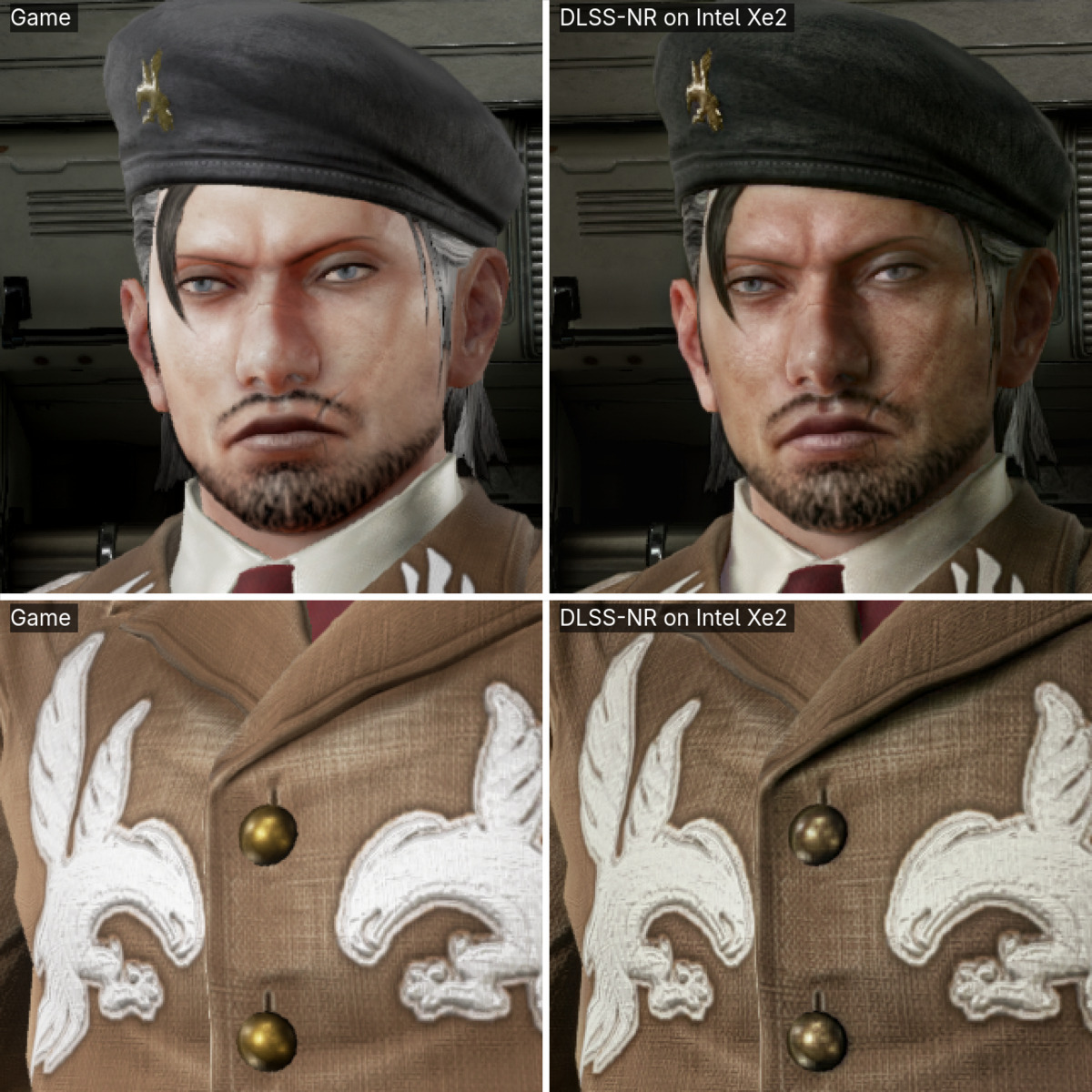
It is an experimental mod. NVIDIA's network runs on Intel's XMX engines beside the game, so
NR costs frame rate instead of adding it. It does not come with NVIDIA's files: you bring
nvngx_dlssnr.dll from a game you own.
The game's own frame on the left, or on top; the same frame through NR on the right, or below.
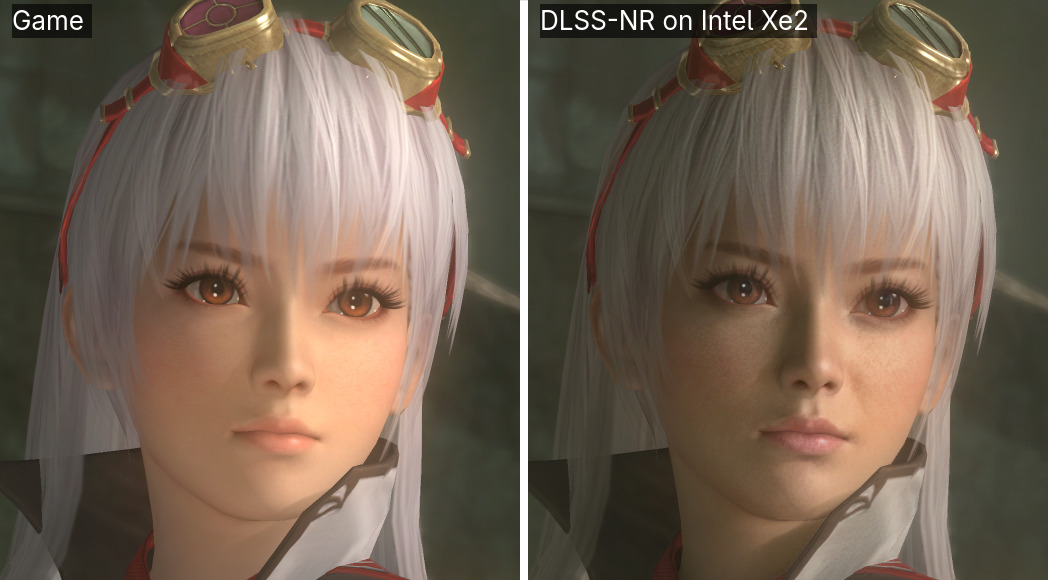
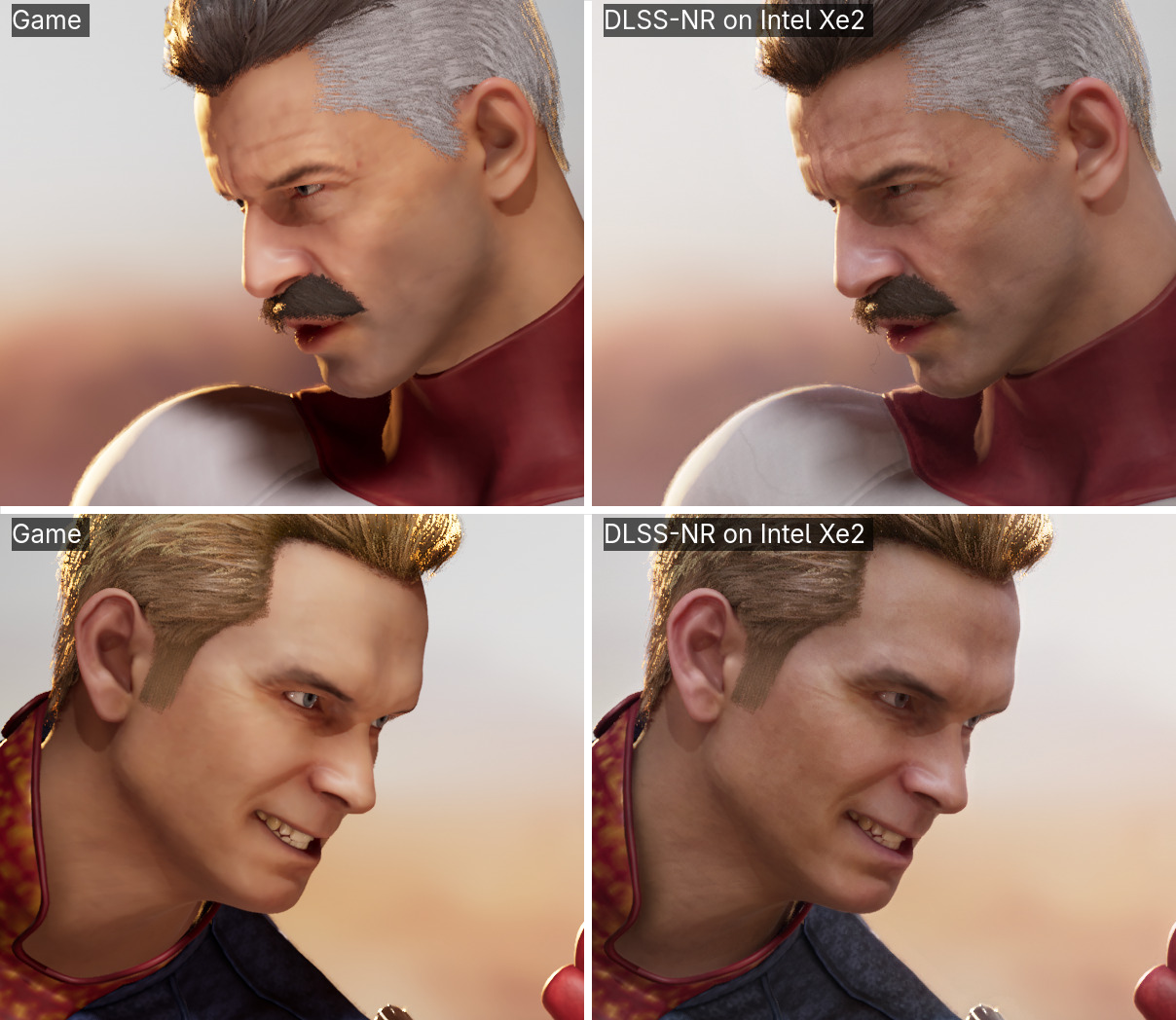
NR does not treat every game alike. In Tekken 7 and Dead or Alive 5 the characters come out darker and with more texture; Mortal Kombat 1's already detailed faces lose its warm colour grade instead. Whether that is better is taste. More stills, measured: docs/DEVS.md.
Tekken 7 © Bandai Namco Entertainment. Dead or Alive 5 Last Round © Koei Tecmo Games. Mortal Kombat 1 © Warner Bros. Entertainment Inc.; its guest characters belong to their respective owners. Shown for comparison.
| GPU | |
|---|---|
| Intel Arc 140V (Core Ultra 200V, Lunar Lake) | Yes: developed and tested on it |
| Intel Arc B570, B580 (Battlemage) | Yes, from players' reports; a B580 is the fastest GPU measured so far |
| Intel Arc Pro B-series (Battlemage) | Should: a Pro B70's GPU report says NR runs there; not yet tried in a game |
| Intel Arc A-series (A310 to A770, Alchemist) | Experimental: it computes correctly on all eleven cards reported so far (A380, A750, A770); an A770 reaches about 40 fps at 1280x720, with render scale 0.4 and network B |
| Intel graphics without XMX engines | No: NR runs on XMX |
Not sure? nr_gpu_probe.exe, in the release, says in under a minute whether NR runs on your GPU
and how long NR's network takes there, without NVIDIA's DLL, and writes nr-gpu-report.txt. On
an Arc A-series card, please post that file with the
Arc A-series report template:
it says where the network's time goes on your card.
| The game's graphics | Windows | Linux |
|---|---|---|
| Vulkan | yes | yes |
| DirectX 8 to 11, 64- or 32-bit | yes, through DXVK, which setup installs | yes, through Proton |
| DirectX 12 | games with Intel XeSS: choose XeSS as the upscaler; with AMD FSR 3.1 and no XeSS: choose FSR; others with OptiScaler set to XeSS (how) | yes, through Proton |
On Windows a Vulkan or DirectX 8–11 game run as administrator, or with UAC turned off, does not get NR. Anti-cheat may refuse NR's files or count them as tampering: use it in single-player games, offline.
You need:
- the latest release, which brings its own Python: there is nothing else to install for it;
- your own
nvngx_dlssnr.dll, copied from a game you own that ships DLSS 5 Neural Rendering: Hogwarts Legacy since its DLSS 5 update (inEngine\Plugins\Runtime\Nvidia\StreamlineCore\Binaries\ThirdParty\Win64), or NBA 2K27. Version 310.9.16 or later holds both of NR's networks, A and B; 310.8 holds A.
Then:
- Extract the release into a folder of its own and keep it there. Run
NR-Setup.exe. - Choose your
nvngx_dlssnr.dll, the game's.exeand its graphics API, then press Check and Install NR. The first install also measures NR on your PC, in under a minute. - Start the game the way you always do: Steam, Epic, a shortcut. In a DirectX 12 game, choose XeSS as the upscaler, or FSR 3 where the game has no XeSS.
- In the game, Home turns NR on and off, and Insert opens its panel: render scale,
network, profile, strength and the rest, changed as you play, and a frame counter, which can
also stay in a corner. In Hogwarts Legacy, profile hogwarts is the look NVIDIA and the
game's developers chose for DLSS 5: milder than
standard, faces milder still. - To take it out, Remove NR puts the game's folder back as it was.
Every button, the speed test, and setup without the window are in the release guide, which is also the README inside the ZIP. On Linux NR is built from source: docs/DEVS.md.
NR runs a large neural network on every frame, on the same GPU as the game.
- On an Arc 140V, play at 1280x720 or lower, with render scale 0.4 and network B: about 20 to 45 fps in the games below. At 1080p and full render scale it manages a few frames a second, which is for screenshots.
- On a desktop Arc B570 or B580 you can play at 1920x1080 with render scale 0.5: about 50 fps with network B on a B580.
- On an Arc A770, about 40 fps at 1280x720 with render scale 0.4 and network B, much as on an Arc 140V, and about 22 at 1920x1080; it pulls ahead only at higher resolutions and render scales. An A750's XMX engines measure about two thirds of an A770's.
- Network B, NVIDIA's smaller model, is up to twice as fast as A and changes the picture a little less. Setup chooses it when your DLL has it.
- A game's frame generation adds its frames after NR, so the screen shows about twice NR's rate: in Hogwarts Legacy with XeSS frame generation, 51-52 fps on screen from NR's 25-26.
- The picture is held steady from frame to frame; a little shimmer can remain where things move.
Every setting, and NR's frame times on each GPU: docs/SETTINGS.md.
Tested here on an Arc 140V, and by players on their own cards. Each row is how it went on that date; a later release can do better or worse.
| Game | Tested on | How it ran | Result | Checked |
|---|---|---|---|---|
| Hogwarts Legacy, after its DLSS 5 update | Arc 140V | Windows, DirectX 12 through XeSS, network B | 25-26 fps of NR's at 1280x720 and render scale 0.4, and 51-52 on screen with XeSS frame generation x2; profile standard or hogwarts |
2026-11-06 |
| Mortal Kombat 11 | Arc 140V | Windows, DirectX 11 through DXVK, network B | 46 fps at 1280x720 and render scale 0.4, about 11.5 at render scale 1.0 | 2026-11-12 |
| Hogwarts Legacy through FSR 3.1 | Arc 140V | Windows, DirectX 12 through the game's FSR 3.1 (FidelityFX 1.0.1), network B | about 18 fps of NR's at 1920x1080 and render scale 0.4 at the title screen, 15-22 in play, with the game's frame generation x4 too; profile hogwarts |
2026-11-12 |
| Hogwarts Legacy through OptiScaler 0.9.4 | Arc 140V | Windows, DirectX 12, OptiScaler's XeSS taking the game's XeSS or its FSR 3, network B | about 28 fps of NR's at 1280x720 and render scale 0.4 | 2026-11-05 |
| Euro Truck Simulator 2 | Arc A770, a player's report (#37) | Windows, DirectX 11 through DXVK | 21-22 fps at 1920x1080 and render scale 0.4 with network B; 6 at full render scale | 2026-11-04 |
| Star Wars Battlefront II (2017) | Arc A770, a player's report (#37) | Windows, DirectX 11 through DXVK | about 22 fps at 1920x1080 and render scale 0.4 with network B, once the player kept the PC's other Vulkan layers out (VK_LOADER_LAYERS_DISABLE=~implicit~) |
2026-11-04 |
| Alien: Isolation | Arc A770, a player's report (#37) | Windows, DirectX 11 through DXVK | 17-18 fps | 2026-11-04 |
| Assetto Corsa | Arc B580, a player's report (#34) | Windows, DirectX 11 through DXVK | smooth at 1920x1080 with network B and render scale 0.5; 9-15 fps with network A | 2026-11-03 |
| Euro Truck Simulator 2 | Arc A750, a player's report (#32) | Windows | NR takes 154 ms a frame at 1920x1080 and render scale 0.6, so about 6 fps at most | 2026-11-02 |
| Nuclear Option | Arc A770, a player's report (#25) | Windows, DirectX 11 through DXVK, or Vulkan | 40 fps at 1280x720 and render scale 0.4 through DirectX 11; 23 through Vulkan, on network A | 2026-11-01 |
| Dead or Alive 5 Last Round | Arc 140V | Windows, DirectX 9 (32-bit) through DXVK, network B | about 22 fps | 2026-10-18 |
| DOOM (2016) | Arc B580, a player's report (#17) | Windows, Vulkan | 73 fps at 1920x1080 and render scale 0.4 with network B, 48 with network A | 2026-10-18 |
| Driving Rogue | Arc B580, a player's report (#17) | Windows, DirectX 11 through DXVK | 53 fps at 1920x1080 and render scale 0.5 with network B, 34 with network A; at full scale 18 and 10 | 2026-10-18 |
| Batman: Arkham Knight | Arc B570, a player's report (#19) | Windows, DirectX 11 through DXVK | playable at 2560x1440 and render scale 0.4 | 2026-10-17 |
| Mafia III | Arc B570, a player's report (#15) | Windows, DirectX 11 through DXVK | about 30 fps at 2560x1440, judged by eye | 2026-10-13 |
| Assassin's Creed Unity | Arc B570, a player's report (#15) | Windows, DirectX 11 through DXVK | works | 2026-10-13 |
| Tekken 7 | Arc 140V | Linux, DirectX 11 through Proton, network A | 30 fps at 800x450 and render scale 0.35 | 2026-09-27 |
| Mortal Kombat 1 | Arc 140V | Linux, DirectX 12 through Proton, network A | works; at full render scale it ran out of memory beside the game | 2026-09-16 |
Tried another game? Tell us how it went, with the file Save report writes: open an issue.
- Nothing changes. Check that NR is on: Home in the game, or Enable NR in the setup
window. A DirectX 12 game must use XeSS as its upscaler, or FSR 3 where it has no XeSS. In a
Vulkan game NR is only in the
.exeyou chose; Check names the one that draws with Vulkan (DOOM 2016:DOOMx64vk.exe). - It is very slow. Lower the game's resolution first, then the render scale, and use network B.
- It stopped after a game update. Remove NR, then Install NR again.
- The game closes while loading. The GPU shares the PC's memory: close other programs and lower the render scale.
- Still stuck? Press Save report in the setup window and attach the file to an issue.
This project was written by AI agents: Claude Opus 5 and 5.5, and ChatGPT Astra and Sol in a parallel tree, under the author's direction. All breakdowns and analysis are written by AI. What that means, and the evidence offered instead of a line-by-line defence: docs/DEVS.md.
- docs/DEVS.md: building and running from source, Linux, the control tools, tests.
- docs/SETTINGS.md: every setting, and measured frame times.
- docs/ARCHITECTURE.md: the recovered network, for running it elsewhere.
- notes/INDEX.md: what was measured, the wrong turns included.
If NR is useful to you, you can support its development on Ko-fi.
Apache License 2.0: LICENSE and NOTICE.
- MLX-DLSS (Apache-2.0) recovered the network's graph from vendor captures, and its tools extract the weights.
- OpenDLSS-NR (MIT): where that graph and the
vendor's differ, this port follows it, checked block by block (
notes/opendlss-reference.md). - DLSSNR-AMD (MIT): the cut in the game's DirectX 12 command list that NR's XeSS and FSR 3.1 paths are built on.
- AMD's FidelityFX SDK (MIT): its API headers lay out the types NR's FSR 3.1 path reads.
- Dear ImGui (MIT) draws the panel in the game, which Paimonshen contributed (#20).
- DXVK 3.1.1 (zlib) ships with the Windows release, for DirectX 8–11 games.
- andyvand/dlss-nr-on-vulkan (Apache-2.0): the CMake build and extra GEMM checks.
DLSS, Neural Rendering and nvngx_dlssnr.dll are NVIDIA Corporation's. This is an independent
reimplementation of the inference pass, not affiliated with or endorsed by NVIDIA, and it
contains no NVIDIA code. No weights and no NVIDIA binary are distributed here.