


RTL Agents brings proper Right-to-Left rendering to the AI chat panels of Antigravity, Cursor, VS Code, Windsurf, and VSCodium — without flipping your editor, your code, or your tables.
Message text is pinned to a right-to-left base, and the browser lays out the Latin runs inside it — library names, commands, inline code — in their own left-to-right order. Because it is pure CSS applied at layout time, streamed text never renders left-aligned and then jumps.
Optimized for Persian, Arabic, and Hebrew.
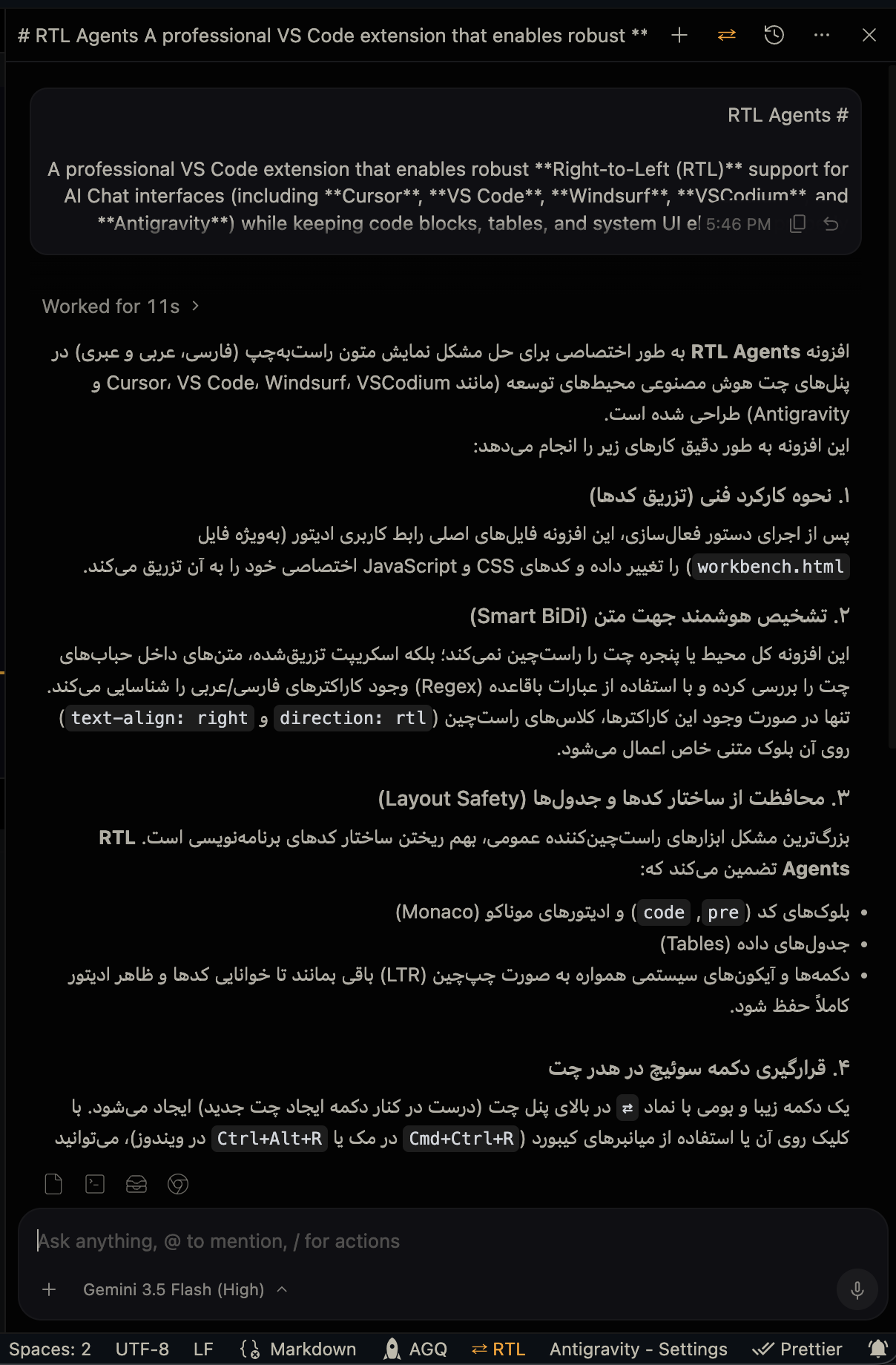
Persian AI responses aligned right, with code blocks and UI left intact
- 🌐 Multi-IDE Support: Detects the running editor and patches every workbench document it owns — including Antigravity's separate agent window.
- ⚡ Native Bidirectional Alignment: The Unicode BiDi algorithm places every embedded Latin run, number and punctuation mark. No character regex to maintain, and a sentence opening with
APIornpm installstays right-aligned like the rest of the reply. - ✨ Zero Flicker While Streaming: Alignment lands before the first paint. There is no per-word JavaScript, no document-wide
MutationObserver, and no measurable CPU cost while a reply generates. - 🛡️ Code & Layout Safety:
pre,code, Monaco editors, and table column order stay LTR — including a code snippet sitting inside a Persian sentence. - ⇄ Native Toggle Button: Injects a
⇄button into the chat header next to "New Chat", borrowing its styling. The header button and the status bar item always agree. - 💾 Persistent & Synced: Remembers your preference across reloads and keeps every patched window in step instantly.
- 🔑 Checksum Bypass: Strips the relevant
product.jsonchecksums to avoid the[Unsupported]warning, and restores them exactly on deactivation. - ♻️ Clean Uninstall: Deactivating removes the button immediately and restores every file byte for byte. A backup from an older IDE build is never written over a newer one.
- 🔄 Auto-Reactivation: Detects editor updates and re-applies the patch.
Install from the VS Code Marketplace or Open VSX, or grab the .vsix from Releases:
# VS Code
code --install-extension rtl-agents-<version>.vsix --force

# Cursor
cursor --install-extension rtl-agents-<version>.vsix --force

# Antigravity
antigravity --install-extension rtl-agents-<version>.vsix --forceBecause the extension modifies workbench files on disk to reach the chat panel, it needs a one-time activation.
- Open the Command Palette —
Ctrl+Shift+P(Windows/Linux) orCmd+Shift+P(macOS). - Run
RTL Agents: Activate RTL. - Fully quit and reopen your IDE. A "Reload Window" is not enough.
- Open the AI chat and press
Ctrl+Alt+R/Cmd+Ctrl+R, or click the⇄button.
Tip
Permission denied on macOS or Linux?
Editor files on disk are write-protected, so this is expected. The command outputs a copyable sudo chown ... fix — run it in your terminal, then activate again.
{
  "rtl-agents.baseDirection": "rtl",
  "rtl-agents.customSelectors": [
    ".my-custom-chat-panel",
    "div[class*=\"custom-message-list\"]"
  ]
}rtl-agents.baseDirection—"rtl"(default) pins every message block to a right-to-left base."auto"lets each paragraph pick its own direction from its first strong character; prefer it only when your chat is mostly left-to-right with occasional RTL passages.rtl-agents.customSelectors— Additional chat container selectors. Text inside them follows the same base direction as the built-in containers. Editing either setting rewrites the injected stylesheet right away; no re-patch needed.
Note
Why the base is pinned rather than detected: first-strong detection reads the direction from a paragraph's first strong character, so an ordinary Persian sentence opening with API, OTP or npm install flips entirely to LTR — left-aligned, with its trailing Persian punctuation on the wrong side. On a representative corpus that misfires on about 40% of lines. The cost of pinning is that an all-English paragraph is right-aligned, word order intact, which is simply how LTR passages sit in an RTL document.
Note
rtl-agents.rtlCharacterRegex is deprecated as of v2.0.0 and ignored — direction is resolved by the browser, not by scanning characters.
| Command | Shortcut | Description |
|---|---|---|
RTL Agents: Activate RTL |
— | Injects the CSS/JS and strips workbench checksums. |
RTL Agents: Toggle RTL/LTR |
Ctrl+Alt+R / Cmd+Ctrl+R |
Switches direction instantly. |
RTL Agents: Deactivate RTL |
— | Restores every patched file to its original state. |
RTL Agents: Check Status |
— | Reports which workbench documents are patched. |
RTL Agents: Restart RTL |
— | Restores originals, then re-applies the patch. |
pnpm install
pnpm build   # bundle the extension
pnpm test    # patch/unpatch round trip and asset generation
pnpm lint
pnpm test exercises the patch layer against synthetic fixtures in a temp directory — it never touches a real IDE installation.
MIT © Foshati