Wavepass Pico turns Konami ICCx arcade card reader into USB HID CardIO device, with HID lighting for SpiceTools / Spice2x.
Based on CrazyRedMachine's WavepassReader and whowechina's aic_pico, build using Codex (5.6 Terra).
- ICCC has been verified with the reader of Busou Shinki Armored Princess Battle Conductor.
- ISO15693 E-Pass and FeliCa AIC cards have both been verified.
- ICCA and ICCB are intended targets of the retained ICCx protocol code, but have not been tested with this firmware.
- The optional ICCx keypad is deliberately not implemented.
- Similar to PN5180, ICCB/C can read both ISO15693 and FeliCa cards.
- HID lighting for SpiceTools / Spice2x, with 6 WS2812B LEDs.
- CLI compatible with whowechina's Pico Series CLI Tool.
- Native serial mode, Pico just acts as USB TTL adapter.
- Extra light patterns for Shinki Cradle display.
| Pico GPIO | Function | MAX3232 module | ICCx XMP-10V connector |
|---|---|---|---|
| GP0 | UART0 TX | TTL RXD (T1IN) to RS-232 TXD (T1OUT) | Pin 8 RXD, green |
| GP1 | UART0 RX | TTL TXD (R1OUT) from RS-232 RXD (R1IN) | Pin 9 TXD, blue |
| GP2 | WS2812B Data |
Power ICCx and LED Boards from Pico VBUS 5V, MAX3232 TTL from Pico 3V3 3.3V, and ensure that each ground pin is shared with Pico GND.
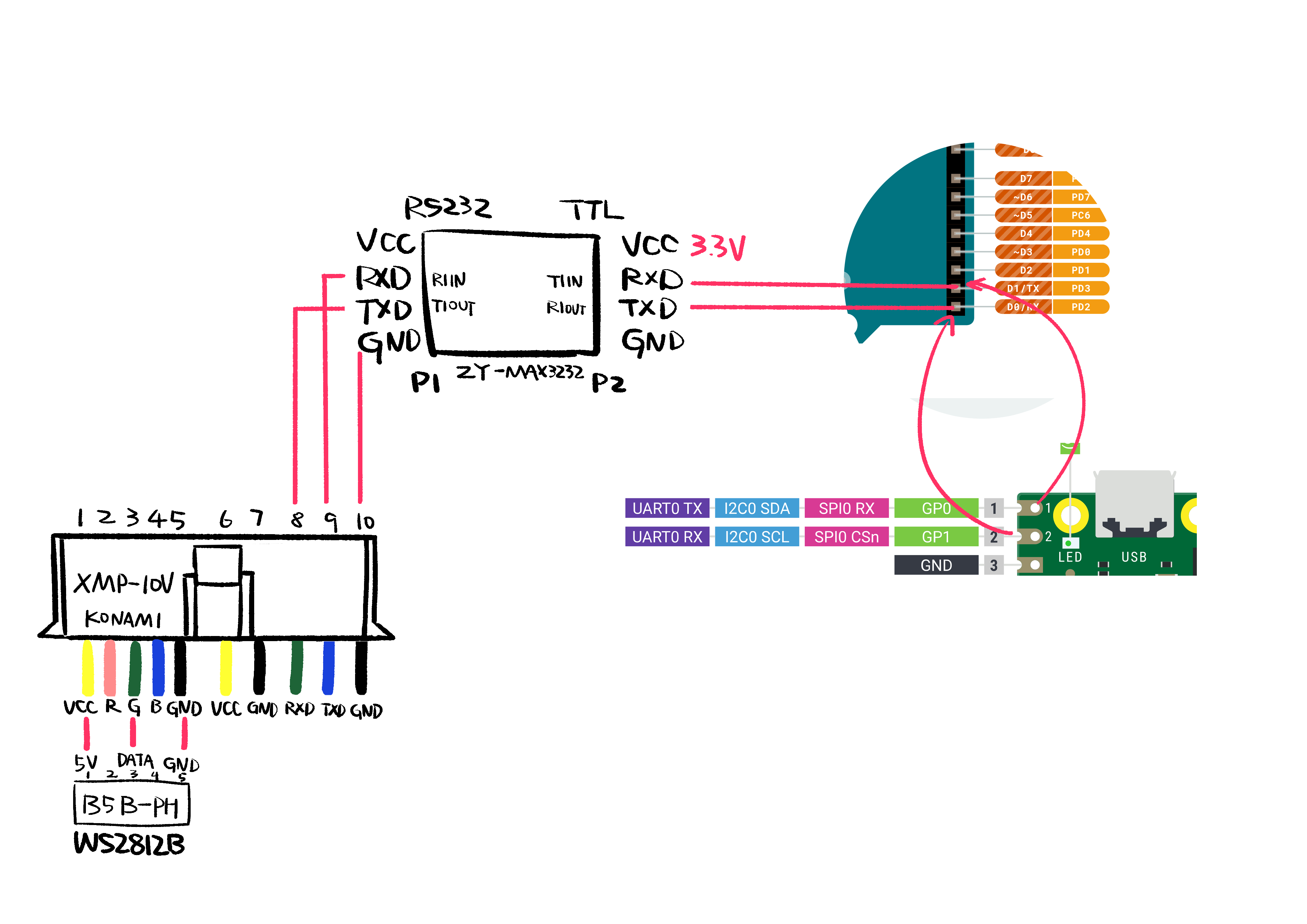
(Hand-drawn wiring diagram for ZY-MAX3232 module.)
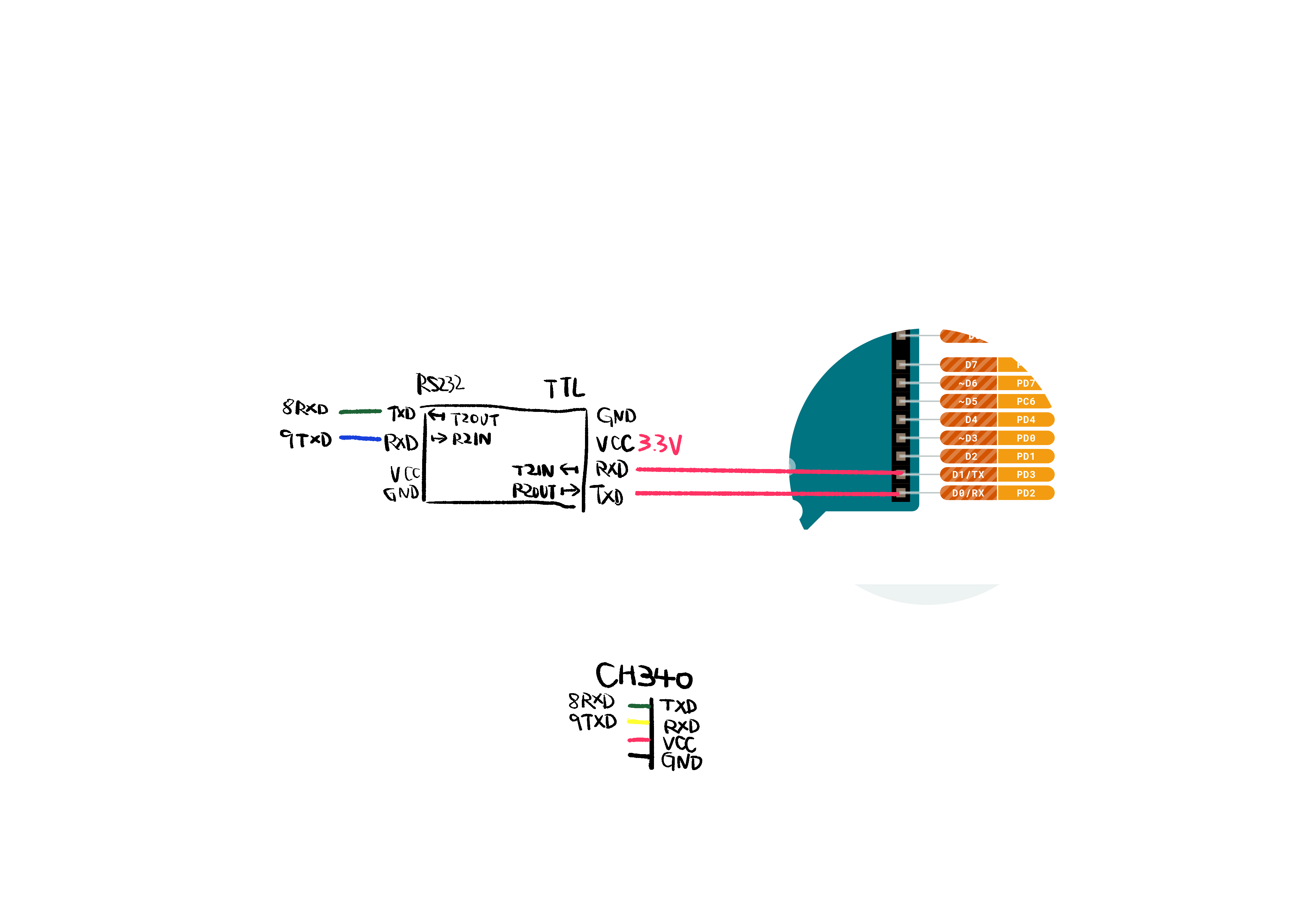
(Hand-drawn wiring diagram for HW-027 module, and common CH340 based USB RS232 download cable.)
A modern ICCC reader usually contains 2 FULL COLOR X3 BOARDs, each with 3 RGB LEDs. They are controlled by a WS2811 controller on BIO2.
This repo includes my replacement design, Konami WS2812B LED BD, uses 3 WS2812B 5050 LEDs and 3 100nF (104) 0603 capacitors while retaining JST B5B-PH connectors. It can easily replace the original boards without modifying the reader.
Wavepass PicoHID CardIO interface.Wavepass PicoHID lighting interface withRed,Green, andBlueparameters.Wavepass Pico CLI Portfor CLI interface.Wavepass Pico ICCx Native Portfor native serial mode.
Use whowechina's Pico Series CLI Tool, then connect to Wavepass Pico CLI Port.
| Command | Description |
|---|---|
display |
Show current settings and status. |
mode cardio / mode native |
Switch CardIO or native serial mode. |
encrypted on / encrypted off |
Enable or disable the encrypted protocol. |
interval 250..60000 |
Set the repeated CardIO report interval in milliseconds. |
level <idle> <active> |
Set reactive mode idle and active brightness. |
light hid|reactive|white|breathe|rainbow|off |
Switch LED pattern. |
monitor on / monitor off |
Enable or disable raw UART logs. |
save |
Save settings to internal flash. |
factory |
Restore and save default settings. |
update |
Enter BOOTSEL firmware update mode. |
I compiled this project using WSL Debian on Windows.
- Setup picosdk.
- Run
./build.sh. - Put Pico into BOOTSEL mode and flash
build/wavepass_pico.uf2.
Written by Codex. Implementation details, protocol behavior, HID reports, flash persistence, and the reason for the selected Pico resources are documented in TECHNICAL_NOTES.md.
Keep in line with aic_pico, this repo is licensed under CC BY-NC 4.0.