Hello,
We have a multiple checkbox field AutomatedEnvironment on a Test Case Item. When multiple are selected (i.e dev, stage, production) and the custom chart is used to determine the % based on Automated Environment field, each TC with multiple selections is counted for each selection. Ideally they would be counted only once in the total count as each TC is only 1 item.
Chart is setup as Test Case type. Aggregated by multiple selection field.
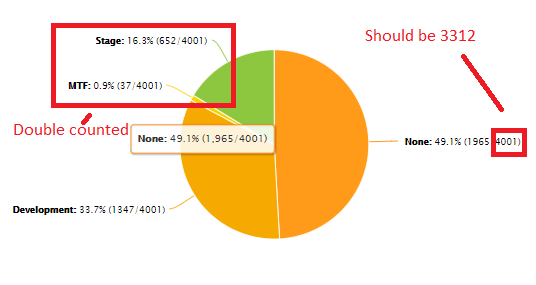
Example: 1000 Test Cases total. 300 test cases have multiple selections on the AutomatedEnvironment field. The graph % count is determined out of 1300 test cases, instead of 1000. In the screenshot, the Test Case either has None, Development checked, or Development +other environment. So each work item should count as 1 towards the total count of TC despite having multiple check box selections.
Hello,
We have a multiple checkbox field AutomatedEnvironment on a Test Case Item. When multiple are selected (i.e dev, stage, production) and the custom chart is used to determine the % based on Automated Environment field, each TC with multiple selections is counted for each selection. Ideally they would be counted only once in the total count as each TC is only 1 item.
Chart is setup as Test Case type. Aggregated by multiple selection field.
Example: 1000 Test Cases total. 300 test cases have multiple selections on the AutomatedEnvironment field. The graph % count is determined out of 1300 test cases, instead of 1000. In the screenshot, the Test Case either has None, Development checked, or Development +other environment. So each work item should count as 1 towards the total count of TC despite having multiple check box selections.