Repository navigation

Replies: 5 comments 8 replies

|
Hi @3dcase Importing Lightroom preset is available since some versions ago. See my comment here: #333 (comment) Keep in mind that the results can definitely very a bit, as RapidRAW uses a completely different processing backend. Hope this helps & Thanks! |

|
Hello CyberTimon,
My appologies for either not scrolling down far enough or something
else happened, I did not see the whole thread.
I will give this a read, looks complicated for a non coder, and see how it goes.
Thanks,
Kees
Sent from Proton Mail for iOS.
…-------- Original Message --------
On Sunday, 03/08/26 at 22:02 Timon Käch ***@***.***> wrote:
Hi @3dcase
Importing Lightroom preset is available since some versions ago. See my
comment here: #333 (comment)
Keep in mind that the results can definitely very a bit, as RapidRAW uses a
completely different processing backend.
Hope this helps & Thanks!
—
Reply to this email directly, view it on GitHub, or unsubscribe.
You are receiving this because you were mentioned.Message ID:
***@***.***>
|

|
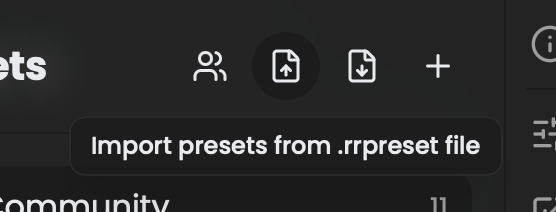
All good. You just need to have the presets in .xmp / .lrtemplate / .rrpreset format and you can simply just import them in the presets panel: No need to execute any scripts. |

|
Hi :) Thank you in advance! |
|
@phinchenbienchen Good idea. I'm working on it :) |

|
@CyberTimon Any updates on this? Or is there an issue/branch you're working on for this? Otherwise I'm sure I could develop this. Wanted to contribute for some time now |
|
Just opened a PR for this feature: #1443 |

|
Hi! Can you please take a look at this preset from LR, that I can export and import back to LR and it works, but in RapidRAW, while it does import, it seems to have no effect at all (note: it should make the image B&W). 400 - Ilford HP5 Plus 400 Curve - test.txt And BTW - for me RapidRAW already beats LR. Can't imagine where it comes next... |

|
I'm having the same issue with a B&W preset that I've imported from LR |

|
I went down the rabbit hole of importing a full legacy Lightroom preset library into RapidRAW, so I'll share what worked for me in case it helps others here. Full disclosure up front: the converter below and this guide were written by my AI agent. I set it the task, then verified and tested the result. Sharing it as-is. When the built-in import isn't enough RapidRAW's preset-panel import handles .xmp and newer .lrtemplate files fine. But older .lrtemplate files (the 2012-generation ones, e.g. legacy film-emulation packs) store their settings as a raw NeXTSTEP plist without an embedded XMP copy. Importing those currently produces an empty or no-effect preset, that (plus probably curve handling) seems to be what's behind the "my B&W preset imports but does nothing" reports in this thread: RapidRAW's curve pipeline uses a fixed 16-point grid, and legacy point curves with more knots collapse it. What the converter does A small single-file Python script, lr2rrpreset.py, no dependencies (stdlib only, Python 3.8+). It reads .lrtemplate folders and writes one .rrpreset bundle per folder, which you then import in one click, the pack is preserved as a preset folder. It handles:
Usage
first argument: one folder of .lrtemplate files, or a parent folder full of pack subfolders (one bundle per pack) result: AwesomeLRPack.rrpreset → drag-import it via the presets panel like any other preset file Caveats It's an AI-written one-off, not an official tool. Read the header comment before trusting it blindly. Results still won't be pixel-identical to Lightroom (different processing backend, as @CyberTimon says, that's expected). Notably RapidRAW's exposure unit is 1.25× Lightroom's and its chromatic-aberration range is ±100 vs Lightroom's ±10; the converter mirrors RapidRAW's own importer semantics for those, same as the XMP import does. Tested on 9 legacy film packs (631 presets). All import cleanly and render sanely; individual packs may still surprise you. I also think the real fix belongs in RapidRAW itself (a proper legacy .lrtemplate parser in the Rust importer. The current one only regex-extracts embedded XMP), and AI-assisted help with that would be welcome. Until then, this gets legacy libraries in the door. If you test it on other packs, I'm curious which settings come out wrong. |
|
Tested two of my fav presets: 400 - Ilford HP5 Plus 400 Curve: 10 adjustment groups 1 presets -> hp5-curve/presets.rrpreset 400 - Ilford HP5 Plus 400 Grain: 3 adjustment groups 1 presets -> hp5-curve-grain/presets.rrpreset |

|
EDIT - they did import, but resulted in color photos, not b&w. If you're interested on more feedback, we can meet on discord or somewhere. |


Uh oh!
There was an error while loading. Please reload this page.
Uh oh!
There was an error while loading. Please reload this page.
empty finished and done with, stop replying!
All reactions